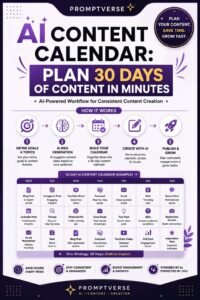
Creating content consistently can be difficult, especially when you’re managing a blog, social media accounts, email newsletters, or multiple marketing channels at the same time.
One day you may have dozens of ideas. The next day, you may have no idea what to publish.
Without a plan, content creation can quickly become stressful and inconsistent.
This is where a content calendar can help.
A content calendar gives you a clear overview of what you plan to publish, where you will publish it, and when it should go live. And with artificial intelligence, creating and managing that calendar can become much faster.
AI can help you brainstorm topics, organize content ideas, create publishing schedules, repurpose existing content, identify gaps, and even suggest different formats for the same topic.
However, AI shouldn’t completely control your content strategy. The best results come from combining AI’s ability to process ideas quickly with your own understanding of your audience, brand, and goals.
In this guide, you’ll learn how to create a practical content calendar with AI and use it to make your content strategy more organized and consistent.
What Is a Content Calendar?
A content calendar is a planning system that helps you organize your upcoming content.
It can include information such as:
- Content topic
- Publishing date
- Content format
- Platform
- Target audience
- Keywords
- Content goal
- Status
- Call to action
- Notes
- Assigned team member
For example, a simple weekly calendar might look like this:
| Day | Content | Platform | Goal |
|---|---|---|---|
| Monday | Educational post | Engagement | |
| Tuesday | Blog article | Website | Traffic |
| Wednesday | Short video | Awareness | |
| Thursday | Tips carousel | Education | |
| Friday | Promotional post | Sales |
The exact structure depends on your business.
Why Use AI to Create a Content Calendar?
Creating a calendar manually can take hours.
You have to think about topics, formats, publishing dates, audience needs, and promotional opportunities.
AI can help speed up this process.
You can use AI to:
- Generate content ideas
- Organize topics into categories
- Create weekly schedules
- Suggest content formats
- Repurpose existing content
- Fill gaps in your calendar
- Create content themes
- Brainstorm seasonal topics
- Develop social media ideas
- Create variations of existing content
Instead of starting with a blank spreadsheet, you can use AI to create a first draft of your calendar and then customize it.
1. Define Your Content Goals
Before creating a content calendar, decide what you want your content to accomplish.
Your goals might include:
- Increasing website traffic
- Growing social media followers
- Generating leads
- Increasing sales
- Building brand awareness
- Educating customers
- Growing an email list
- Establishing authority in your niche
- Building a community
Your goals should influence the type of content you publish.
For example, if your primary goal is generating leads, your calendar might include educational articles combined with case studies, lead magnets, and calls to action.
If your goal is brand awareness, you might focus more heavily on educational and entertaining content.
2. Identify Your Target Audience
A content calendar becomes much more useful when it is designed around a specific audience.
Think about:
- Who your audience is
- What they want
- What problems they have
- What questions they ask
- What they struggle with
- What information they need
- What products or services they are interested in
You can give this information to AI and ask it to generate content ideas specifically for that audience.
For example, instead of asking AI:
“Create a content calendar for a business.”
You could explain that you run a small business website aimed at beginners who want to learn how to use AI for productivity.
That additional context can produce much more relevant ideas.
3. Choose Your Content Categories
Content categories make your calendar easier to organize.
For example, a technology website might use:
- Tutorials
- Product reviews
- Industry news
- How-to guides
- Comparisons
- Beginner guides
- Expert tips
A small business might use:
- Educational content
- Customer stories
- Product information
- Behind-the-scenes content
- Promotional content
- Frequently asked questions
Ask AI to help you create categories that match your niche and audience.
Having categories also helps prevent your calendar from becoming repetitive.
4. Brainstorm Content Ideas With AI
Once you know your goals and categories, ask AI to generate ideas.
Give it enough information about:
- Your niche
- Your audience
- Your content categories
- Your goals
- Your preferred platforms
- Your publishing frequency
You can ask for 30, 60, or even 90 ideas.
But don’t automatically use every suggestion.
Review the ideas and remove topics that are:
- Too generic
- Repetitive
- Irrelevant
- Too difficult to produce
- Unrelated to your goals
The purpose of AI brainstorming is to give you options.
You remain the editor.
5. Turn One Idea Into Multiple Pieces of Content
One of the biggest advantages of AI is content repurposing.
Suppose you create a detailed blog post titled:
“How to Use AI to Save Time at Work.”
That one article could become:
- Three social media posts
- A short video script
- A carousel
- An email newsletter
- A checklist
- A discussion question
- A short educational post
AI can help transform the original content into different formats.
This allows you to create more content without constantly starting from scratch.
6. Decide How Often You Want to Publish
Don’t create a calendar that is impossible to maintain.
If you’re working alone, publishing five pieces of content every day may not be realistic.
A sustainable schedule might be:
- Two blog posts per week
- Three social media posts per week
- One newsletter per week
Or perhaps you prefer a different schedule.
Consistency matters more than trying to produce an unrealistic amount of content.
AI can help you create a schedule based on the amount of content you can realistically produce.
7. Create a Weekly Content Calendar
Now you can begin organizing your ideas.
For example:
Monday
Educational social media post
Tuesday
Blog article
Wednesday
Short-form video
Thursday
Customer-focused post
Friday
Promotional content
Saturday
Community question
Sunday
Weekly recap
You can change this structure depending on your audience and platforms.
The important thing is to create a repeatable system.
8. Plan Content Around Themes
Another useful strategy is to organize your calendar around weekly or monthly themes.
For example, if your website focuses on AI:
Week 1: AI for productivity
Week 2: AI for small businesses
Week 3: AI for content creation
Week 4: AI for freelancers
This gives your content a sense of structure.
AI can help you brainstorm subtopics for each theme.
9. Include Different Types of Content
A good calendar shouldn’t contain the same type of post repeatedly.
Try to mix:
Educational Content
Teach your audience something useful.
Inspirational Content
Share stories, lessons, or motivating ideas.
Entertaining Content
Use humor, interesting observations, or relatable situations.
Promotional Content
Showcase products, services, offers, or special announcements.
Community Content
Ask questions and encourage discussion.
Authority Content
Share insights, research, case studies, or expert perspectives.
This variety can make your content more engaging.
10. Use AI to Fill Content Gaps
Sometimes you may have a calendar with several empty spaces.
Instead of randomly adding topics, ask AI to identify what is missing.
For example, you might discover that your calendar contains plenty of educational content but very little content designed to generate leads.
AI can suggest topics that support your missing objectives.
This makes your calendar more balanced.
11. Plan Seasonal Content
Seasonal events can create useful opportunities for content.
Depending on your industry, you might plan around:
- Holidays
- New Year
- Back-to-school periods
- Industry events
- Shopping seasons
- Special promotions
- Company anniversaries
AI can help brainstorm seasonal content ideas relevant to your audience.
Plan these posts ahead of time rather than trying to create them at the last minute.
12. Create an SEO Content Calendar
If you’re running a blog, you can also use AI to organize your content around SEO topics.
Start with broad subjects related to your niche.
Then identify supporting topics.
For example:
Main topic: AI for small businesses
Supporting topics:
- How small businesses can use AI
- AI tools for small businesses
- AI for customer service
- AI for marketing
- AI for productivity
- AI automation for small businesses
- Common AI mistakes
This creates a group of related articles that can support one another through internal linking.
AI can help brainstorm these supporting topics, while you should still conduct proper keyword and competitor research before publishing.
13. Add Content Statuses
Your content calendar should show what stage each piece is in.
Useful statuses include:
- Idea
- Researching
- Drafting
- Editing
- Designing
- Scheduled
- Published
This makes it much easier to see what needs attention.
For a team, you can also assign each piece to a specific person.
14. Use AI to Write Content Briefs
Once you’ve chosen a topic, AI can help create a content brief.
A useful brief might include:
- Working title
- Target audience
- Search intent
- Main points
- Suggested headings
- Examples to include
- Call to action
- Content format
This gives the writer a clear direction before drafting begins.
It can also reduce the time spent figuring out what an article should cover.
15. Build a Monthly Content Calendar
A monthly calendar gives you a bigger picture.
For example:
Week 1
- Blog: Beginner guide
- Social: Three educational posts
- Video: Quick tutorial
- Email: Weekly tips
Week 2
- Blog: How-to article
- Social: Customer-focused content
- Video: Common mistakes
- Email: Helpful resources
Week 3
- Blog: Comparison article
- Social: Tips and discussion
- Video: Product demonstration
- Email: Case study
Week 4
- Blog: Expert guide
- Social: Recap and promotional content
- Video: Frequently asked questions
- Email: Monthly roundup
AI can help you generate the initial structure, but you should adjust it based on your actual business priorities.
16. Review Your Calendar Before Publishing
Never assume that an AI-generated calendar is automatically good.
Review every topic.
Ask:
- Does this help my audience?
- Does it support my business goals?
- Is there enough variety?
- Are there repeated topics?
- Is the publishing frequency realistic?
- Does the content match my brand?
- Are important seasonal opportunities included?
Remove anything that doesn’t make sense.
17. Track What Performs Best
A content calendar shouldn’t be a document you create once and forget.
Track your results.
Depending on your platform, look at metrics such as:
- Views
- Clicks
- Shares
- Comments
- Saves
- Website traffic
- Email signups
- Leads
- Sales
Then use those results to improve your future calendar.
If certain topics consistently perform well, create more content around them.
If other topics receive little attention, reconsider whether they belong in your strategy.
Common Mistakes to Avoid
Planning Too Much Content
A huge calendar isn’t useful if you can’t maintain it.
Start with a realistic schedule.
Letting AI Decide Everything
AI can suggest ideas, but your business goals and audience should guide the final decisions.
Publishing Repetitive Content
Use different formats, topics, and perspectives.
Ignoring Your Analytics
Your performance data can tell you what your audience actually responds to.
Forgetting Flexibility
A calendar is a plan, not a prison.
If something important happens in your industry, you may need to adjust your schedule.
A Simple AI Content Calendar Workflow
You can make the entire process repeatable:
Step 1: Define your goals.
Step 2: Identify your audience.
Step 3: Choose content categories.
Step 4: Ask AI for topic ideas.
Step 5: Filter and prioritize the best ideas.
Step 6: Assign publishing dates.
Step 7: Choose formats and platforms.
Step 8: Create content briefs.
Step 9: Produce and edit the content.
Step 10: Schedule and publish.
Step 11: Track performance.
Step 12: Use the results to improve next month’s calendar.
This system turns content creation from a daily guessing game into a repeatable process.
Final Thoughts
Creating a content calendar with AI can make content marketing much easier to manage.
AI can help you brainstorm ideas, organize topics, build schedules, repurpose content, create briefs, identify gaps, and plan content around specific goals.
But the technology should support your strategy rather than replace it.
Start with a realistic publishing schedule. Understand your audience. Create different types of content. Use AI to reduce repetitive planning work, then review everything before it becomes part of your publishing strategy.
Most importantly, pay attention to what your audience actually responds to.
A good content calendar isn’t the one with the most posts. It’s the one that helps you consistently publish the right content for the right audience at the right time.