Artificial intelligence has become a powerful tool for students, professionals, business owners, content creators, and everyday users. AI can help people write faster, research information, organize tasks, analyze data, learn new skills, and automate repetitive work.
However, using AI effectively is not as simple as typing a question and accepting whatever answer appears.
AI tools can make mistakes, misunderstand instructions, produce outdated information, or give answers that sound convincing even when they are incorrect. People can also misuse AI by relying on it too heavily or using it for tasks that require human judgment.
Understanding the most common AI mistakes can help you get better results while avoiding unnecessary problems.
In this guide, we’ll explore the common mistakes people make when using AI and how to use artificial intelligence more responsibly and effectively.
1. Trusting Everything AI Says
One of the biggest mistakes people make is assuming that AI is always correct.
AI can provide useful answers, but it can also generate inaccurate information. Sometimes an answer may sound confident and professional even when important details are wrong.
This can happen because AI systems generate responses based on patterns in information rather than thinking exactly like a human expert.
Before relying on an AI-generated answer, ask yourself:
- Is the information important?
- Could it have changed recently?
- Does the answer include specific facts or statistics?
- Can I verify the information?
- Is the topic sensitive or high-stakes?
For important information, check reliable sources before making decisions.
2. Using Vague Prompts
Another common mistake is giving AI instructions that are too vague.
For example:
“Write an article about technology.”
This doesn’t tell the AI much about what you actually need.
A better prompt might be:
“Write a beginner-friendly 1,500-word article explaining how artificial intelligence is changing education. Use clear headings, practical examples, and a conversational tone. The target audience is college students and beginners.”
The second prompt provides information about:
- Topic
- Length
- Audience
- Tone
- Structure
- Purpose
The more useful context you provide, the more useful the response is likely to be.
3. Expecting AI to Read Your Mind
AI doesn’t automatically know what you mean.
If your instructions are incomplete, the AI may make assumptions.
For example, if you ask:
“Make this better.”
What does “better” mean?
Do you want it:
- Shorter?
- More professional?
- More persuasive?
- Easier to understand?
- More conversational?
- More detailed?
Instead, explain what you want changed.
For example:
“Rewrite this paragraph in a friendly and professional tone. Make it easier for beginners to understand while keeping the original meaning.”
Clear instructions reduce unnecessary revisions.
4. Using AI Without Providing Context
Context is one of the most important parts of getting useful AI responses.
If you’re asking AI to write something for your business, explain the business, audience, product, and objective.
If you’re asking for help with a school assignment, explain the subject, level, requirements, and format.
For example, instead of:
“Write an email.”
Try:
“Write a polite email to a customer explaining that their order will arrive two days later than expected. Apologize briefly and provide a clear update.”
The additional context makes the task much easier for AI to understand.
5. Copying AI Content Without Editing
AI can create polished-looking content quickly, but publishing or submitting everything exactly as generated can be a mistake.
AI-generated content may contain:
- Repetition
- Generic statements
- Incorrect facts
- Awkward wording
- Missing context
- Unnecessary information
- A tone that doesn’t match your audience
Always review the output.
Add your own examples, experience, opinions, and information where appropriate.
AI should usually be treated as a starting point rather than the final version.
6. Relying on AI Too Much
AI can make many tasks easier, but excessive dependence can become a problem.
For example, if someone uses AI to answer every question without trying to understand the subject, they may become less confident when they need to solve a problem independently.
Students may use AI for every assignment instead of learning the material.
Professionals may allow AI to make decisions that require experience and judgment.
A better approach is to use AI to support your abilities, not replace them.
Use it to explain, brainstorm, organize, and assist while continuing to develop your own skills.
7. Asking AI to Do Work You Don’t Understand
Another common mistake is using AI to complete a task without understanding the result.
For example, someone might ask AI to generate code and immediately use it without knowing what the code does.
The same problem can happen with:
- Financial calculations
- Research
- Business plans
- Academic work
- Data analysis
- Technical documents
If the result matters, take time to understand it.
AI can help you get started, but you should still know what you’re using and why.
8. Failing to Fact-Check Important Information
Fact-checking is especially important when AI is used for topics where incorrect information could cause harm.
These areas may include:
- Health
- Finance
- Law
- Science
- Safety
- Education
- Current events
For example, if AI gives you health information, don’t assume it is a substitute for a qualified medical professional.
If you’re researching a legal issue, verify important details using reliable legal sources or professional advice.
The more important the information, the more important verification becomes.
9. Using Outdated Information
Some AI tools may not always have access to the latest information, depending on the system and how it retrieves information.
This matters when you’re asking about:
- Current events
- Prices
- Software features
- Laws and regulations
- Political developments
- Product availability
- Sports results
- Recent research
If information needs to be current, verify it using up-to-date sources.
Don’t assume that an AI answer is automatically based on today’s information.
10. Sharing Sensitive Information
Privacy is another important issue.
People sometimes paste private or confidential information into AI tools without considering the consequences.
This might include:
- Passwords
- Financial information
- Private customer information
- Personal identification details
- Confidential business documents
- Proprietary company information
- Private conversations
Before entering sensitive information into an AI service, understand how that service handles data and what privacy controls are available.
When in doubt, remove unnecessary personal or confidential information.
11. Using AI for Important Decisions Without Human Judgment
AI can help compare options and organize information, but it shouldn’t automatically make every important decision for you.
For example, AI can help you compare two business strategies.
It can identify advantages and disadvantages.
But you still need to consider:
- Your goals
- Your circumstances
- Your experience
- Your risk tolerance
- Information the AI may not know
AI can support decision-making, but humans remain responsible for important choices.
12. Trying to Automate Everything
Automation can save time, but not every task should be automated.
Some tasks benefit from human interaction.
For example, customer service can use AI to answer simple questions, but a frustrated customer may need to speak with a real person.
Similarly, AI can draft a personal message, but important relationships may benefit from words that come directly from you.
The goal should be smart automation, not maximum automation.
13. Ignoring Your Own Voice
AI can write in a polished way, but polished doesn’t always mean personal.
If you use AI to create content, your writing can start sounding generic if you don’t add your own personality.
This is particularly important for:
- Bloggers
- Social media creators
- Business owners
- Authors
- Marketers
- Personal brands
Add your own stories, experiences, opinions, examples, and sense of humor.
Your unique perspective is one thing AI cannot simply duplicate.
14. Using AI-Generated Images Without Checking Them
AI image-generation tools have become increasingly powerful, but generated images can still contain mistakes.
Depending on the tool and prompt, you may see problems with:
- Text
- Hands
- Objects
- Logos
- Product details
- Facial features
- Proportions
Always inspect AI-generated visuals before publishing them.
If you’re creating an advertisement or product image, make sure the result accurately represents what you’re offering.
15. Asking AI to Handle Everything in One Prompt
Sometimes people provide a huge request containing ten different tasks and expect a perfect answer immediately.
This can make the output less focused.
Instead, break large tasks into stages.
For example:
Step 1: Research the topic.
Step 2: Create an outline.
Step 3: Write the introduction.
Step 4: Develop each section.
Step 5: Edit the article.
Step 6: Create SEO elements.
Working in stages gives you more control over the final result.
16. Not Reviewing AI-Generated Emails
AI can be excellent at drafting emails, but sending an AI-generated message without reading it first can cause problems.
The message might:
- Use the wrong name
- Include an incorrect date
- Sound too formal
- Make an incorrect assumption
- Contain information you didn’t intend to share
Always read the email before sending it.
A 20-second review can prevent an embarrassing mistake.
17. Using AI to Produce Quantity Instead of Quality
AI makes it possible to generate a huge amount of content quickly.
But more content doesn’t automatically mean better results.
A website with 100 low-quality articles isn’t necessarily more valuable than a website with 20 excellent ones.
Instead of asking:
“How much content can AI create?”
ask:
“How much useful content can I create?”
Focus on solving real problems and providing information people can actually use.
18. Ignoring Copyright and Ownership Issues
People sometimes assume that anything AI generates can automatically be used without consideration.
That’s not always a safe assumption.
When using AI for commercial content, images, music, code, or other creative work, understand the terms of the specific tool you’re using and consider whether third-party materials are involved.
If you’re using AI to create business content, it’s also wise to maintain records of your original work and review the applicable licensing requirements.
19. Using AI Without Learning How to Prompt
You don’t need to become a professional prompt engineer to use AI effectively.
However, learning basic prompting skills can dramatically improve your results.
A useful prompt often includes:
Role: Who should the AI act as?
Task: What should it do?
Context: What information does it need?
Audience: Who is the result for?
Format: How should the answer be structured?
Tone: How should it sound?
For example:
“Act as a content strategist. Create 15 blog topic ideas for a beginner technology website. Focus on practical problems students face. Provide a suggested title and a one-sentence description for each idea.”
This gives AI a clear framework to follow.
20. Assuming AI Will Always Understand Your Intent
Even good prompts can sometimes produce unexpected results.
AI may interpret a phrase differently from what you intended.
When that happens, don’t simply start over.
Explain what was wrong.
For example:
“The ideas are too advanced. Rewrite them for complete beginners and avoid technical terminology.”
You can refine an AI response through multiple interactions.
Think of the process as collaboration rather than a one-time command.
21. Forgetting to Give Feedback
If the first AI response isn’t useful, tell it what needs to change.
For example:
“Make this shorter.”
“Use simpler language.”
“Give me more practical examples.”
“Remove the repetitive sections.”
“Make the tone more conversational.”
AI can often improve its output when you provide clear feedback.
22. Believing AI Will Solve Every Productivity Problem
AI can improve productivity, but it can’t fix poor planning, unclear priorities, or bad habits by itself.
If you spend your entire day switching between tasks, installing more AI tools may not solve the problem.
You may need to:
- Set clearer priorities
- Reduce distractions
- Schedule focused work
- Delegate tasks
- Improve your workflow
- Take regular breaks
AI is a tool. It works best when combined with good habits.
How to Use AI More Effectively
Avoiding these mistakes doesn’t mean you need to become an AI expert.
Start with a simple approach.
1. Define the Goal
Know what you want AI to help you accomplish.
2. Give Clear Instructions
Provide enough context for the AI to understand the task.
3. Review the Result
Never blindly accept important AI-generated information.
4. Add Human Input
Include your own experience, judgment, creativity, and personality.
5. Verify Important Facts
Use reliable sources for information that matters.
6. Protect Sensitive Information
Avoid sharing private or confidential information unnecessarily.
7. Improve Your Prompts
If the result isn’t good, explain what needs to change.
8. Keep Learning
AI tools and best practices continue to evolve, so remain open to learning new approaches.
A Simple Rule for Using AI
A useful rule is:
AI can assist you, but you remain responsible for the result.
If AI writes an email, read it.
If AI provides a fact, verify it when necessary.
If AI creates an article, edit it.
If AI analyzes data, understand the conclusions.
If AI recommends something important, consider the recommendation carefully.
This mindset allows you to benefit from AI without becoming overly dependent on it.
Final Thoughts
AI can be incredibly useful, but using it effectively requires more than knowing how to ask a question.
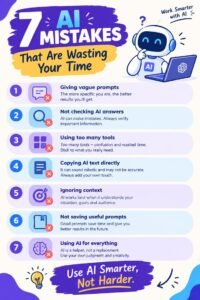
The most common mistakes include trusting AI blindly, using vague prompts, copying generated content without editing, sharing sensitive information, ignoring fact-checking, relying on AI too heavily, and trying to automate everything.
The best AI users aren’t necessarily the people who use the most AI tools.
They are the people who understand when AI is useful, when human judgment is necessary, and how to combine the two effectively.
Use AI to save time, explore ideas, improve your work, and handle repetitive tasks. But keep your critical thinking, creativity, responsibility, and personal judgment at the center of everything you do.
When used thoughtfully, AI can be a powerful assistant rather than a replacement for the skills that make your work valuable.