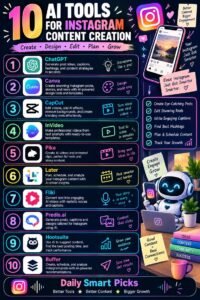
Creating social media content consistently can be one of the hardest parts of growing an online presence.
You need fresh ideas, engaging captions, attractive visuals, short-form videos, relevant hashtags, and a consistent posting schedule. If you’re managing social media for a business, creator brand, or yourself, it can quickly feel like a full-time job.
This is where artificial intelligence can help.
AI can make many parts of the content creation process faster. It can help you brainstorm ideas, write captions, create content calendars, develop video scripts, repurpose existing content, analyze information, and even assist with visual content.
But AI shouldn’t completely take over your social media strategy.
The best results usually come from combining AI’s speed with human creativity, experience, personality, and judgment.
In this guide, you’ll learn how to use AI to create social media content efficiently while keeping your content useful, authentic, and engaging.
Why Use AI for Social Media Content?
Social media requires consistency.
Unfortunately, coming up with new content every day can be exhausting.
AI can help reduce some of the repetitive work involved in content creation.
For example, you can use AI to:
- Generate content ideas
- Write caption drafts
- Create content calendars
- Brainstorm hooks
- Develop video scripts
- Repurpose long-form content
- Create post variations
- Research audience questions
- Organize campaigns
- Improve existing captions
- Brainstorm visual concepts
Instead of starting from a blank page every time you need to publish something, AI can give you a starting point.
That can save a significant amount of time.
1. Define Your Social Media Goal
Before asking AI to create content, decide what you’re trying to accomplish.
Your goal might be to:
- Increase brand awareness
- Generate leads
- Sell products
- Build a community
- Educate your audience
- Drive website traffic
- Promote a service
- Grow your personal brand
- Increase engagement
Your goal influences the type of content you should create.
For example, an online store might focus heavily on product demonstrations and customer testimonials, while an educational creator might focus on tutorials, tips, and explanations.
AI can help you create content, but you need to decide why the content exists.
2. Understand Your Target Audience
Good social media content starts with understanding the people you’re trying to reach.
Think about:
- Their problems
- Their interests
- Their questions
- Their goals
- Their frustrations
- Their preferences
- The type of content they already engage with
You can ask AI to help brainstorm potential audience questions and content themes.
For example, if your audience consists of beginner freelancers, you might discover content topics such as:
- How to find your first client
- How to create a portfolio
- How to price freelance services
- Common beginner mistakes
- How to write proposals
The more specific your audience is, the easier it becomes to create relevant content.
3. Generate Social Media Content Ideas
One of the easiest ways to use AI is for brainstorming.
Instead of asking:
“Give me social media ideas.”
Give the AI more context.
Tell it:
- Your industry
- Your target audience
- Your platform
- Your goal
- Your content style
- The type of products or services you offer
You can then ask for ideas in different categories.
For example:
Educational Content
- How-to guides
- Tips
- Tutorials
- Mistakes to avoid
- Frequently asked questions
Entertaining Content
- Memes
- Stories
- Relatable situations
- Challenges
- Behind-the-scenes content
Promotional Content
- Product demonstrations
- Customer results
- Offers
- Testimonials
- Product comparisons
Community Content
- Questions
- Polls
- Opinions
- Discussions
- User-generated content
Having different content categories prevents your feed from becoming repetitive.
4. Create a Content Calendar With AI
Posting randomly can make social media management stressful.
A content calendar gives you a clear plan.
AI can help you organize content into a weekly or monthly schedule.
For example:
Monday: Educational tip
Tuesday: Behind-the-scenes post
Wednesday: Short video
Thursday: Customer story
Friday: Promotional post
Saturday: Question or poll
Sunday: Personal or motivational content
You can adjust the schedule based on your audience and platform.
A content calendar also makes batch creation easier.
Instead of creating one post every day, you can prepare several posts at once.
5. Use AI to Write Better Captions
Captions are another area where AI can save time.
You can provide the AI with your topic and ask for several caption options.
For example, you might request:
- A short caption
- A conversational caption
- A storytelling caption
- A promotional caption
- A question-based caption
However, don’t simply copy and paste every AI-generated caption.
Edit it so that it sounds like you.
Add your own experiences, opinions, examples, and personality.
Your audience should feel like they’re hearing from a real person or brand.
6. Create Strong Social Media Hooks
The first few words of a social media post can determine whether someone keeps reading.
AI can help brainstorm hooks such as:
- Questions
- Surprising statements
- Problems
- Curiosity-based openings
- Mistakes
- Contrarian ideas
- Quick tips
For example, instead of:
“Here are some productivity tips.”
You could use:
“If your to-do list keeps getting longer, you’re probably making this mistake.”
The second version creates curiosity.
You can ask AI to generate multiple hooks for the same topic and choose the one that best matches your audience.
7. Create Short-Form Video Scripts
Short-form video has become an important part of social media marketing.
AI can help you create scripts for:
- Reels
- TikTok videos
- YouTube Shorts
- Educational clips
- Product demonstrations
- Talking-head videos
- Faceless videos
A simple short-video structure might be:
Hook → Problem → Solution → Example → Call to action
For example:
Hook: “Struggling to stay consistent on social media?”
Then explain the problem, provide a practical solution, and end with a simple action for viewers.
AI can help you brainstorm variations, but your delivery and personality make the video feel authentic.
8. Repurpose Existing Content
One of the smartest ways to use AI is content repurposing.
You don’t always need to create something completely new.
For example, take one blog post and turn it into:
- Five social media posts
- Three short-video scripts
- A carousel
- An email newsletter
- A question for your audience
- Several quote graphics
This can dramatically reduce the amount of time you spend creating content.
If you already have useful content, AI can help you extract more value from it.
9. Use AI for Social Media Graphics
AI-powered design tools can help generate ideas for visual content.
You can create concepts for:
- Quote graphics
- Infographics
- Product announcements
- Promotional posts
- Educational carousels
- Thumbnails
- Story graphics
You can also use AI to brainstorm visual layouts before creating the final design.
However, make sure your visuals maintain consistent branding.
Use recognizable fonts, layouts, messaging, and design elements so people can identify your content easily.
10. Create Social Media Carousels
Carousels are useful for educational content.
A carousel might look like:
Slide 1: A strong headline
Slide 2: The problem
Slide 3: Tip #1
Slide 4: Tip #2
Slide 5: Tip #3
Slide 6: Example
Slide 7: Final takeaway
Slide 8: Call to action
AI can help organize the information and create a logical slide structure.
You should then simplify the wording and make sure every slide is easy to read.
11. Generate Content Variations
You don’t always need a completely different idea.
You can take one topic and create multiple versions.
For example, the topic “How to save money” could become:
- Five money-saving tips
- Three common budgeting mistakes
- A short video
- A personal story
- A checklist
- A question for followers
- A carousel
AI can help you explore these different formats.
This makes your content strategy much more efficient.
12. Use AI to Improve Your Existing Posts
AI isn’t only useful for creating new content.
You can also give it an existing caption and ask for improvements.
For example, you might ask it to make the caption:
- Shorter
- Clearer
- More conversational
- More engaging
- More professional
- More persuasive
- Easier to understand
You can then compare the versions and choose the one that best fits your brand.
13. Create Calls to Action
A call to action tells your audience what to do next.
Examples include:
- Comment below
- Save this post
- Share this with a friend
- Visit the website
- Send us a message
- Download the guide
- Sign up for the newsletter
- Check out the product
AI can generate different calls to action based on the purpose of your post.
Don’t use a strong sales CTA on every post, though.
Sometimes the best CTA is simply encouraging conversation.
14. Build a Consistent Brand Voice
One problem with AI-generated content is that it can sound generic.
Your brand needs a recognizable voice.
Decide whether your content should sound:
- Friendly
- Professional
- Educational
- Funny
- Bold
- Inspirational
- Casual
- Conversational
You can give AI examples of your existing writing and ask it to maintain the same general tone.
But always review the final result.
Your audience should recognize your voice even when AI helped create the content.
15. Use AI to Research Content Topics
AI can help identify questions and topics worth exploring.
You can ask it to organize potential topics around:
- Frequently asked questions
- Beginner problems
- Industry challenges
- Customer objections
- Common mistakes
- Popular educational themes
For important or current topics, verify information using reliable sources.
AI should help organize your research, not become your only source of truth.
16. Create a Social Media Workflow
A simple AI-assisted workflow could look like this:
Step 1: Choose a topic.
Step 2: Ask AI for content angles.
Step 3: Choose the strongest angle.
Step 4: Create an outline.
Step 5: Draft the caption or script.
Step 6: Edit it using your own voice.
Step 7: Create the visual.
Step 8: Add a relevant call to action.
Step 9: Review everything.
Step 10: Schedule and publish.
This process can make content creation much more manageable.
17. Don’t Let AI Make Your Content Boring
AI can produce technically correct content that still feels lifeless.
To avoid this, add:
- Personal stories
- Real examples
- Opinions
- Humor
- Lessons learned
- Customer experiences
- Original observations
For example, instead of asking AI to create a generic post about freelancing, share something you personally learned from working with clients.
AI can help structure the story, but the experience comes from you.
That’s what makes the content unique.
Common Mistakes When Using AI for Social Media
Posting Raw AI Content
Always review and personalize AI-generated content.
Using the Same Format Every Day
Mix videos, images, carousels, stories, text posts, questions, and other formats.
Ignoring Your Audience
Don’t create content simply because AI suggested it.
Make sure it is relevant to your audience.
Overusing Promotional Content
People don’t follow social media accounts just to see advertisements.
Balance promotional posts with educational, entertaining, and useful content.
Chasing Every Trend
Not every trend fits your brand.
Choose trends that make sense for your audience.
Forgetting Human Interaction
Social media is social.
Reply to comments, answer questions, and participate in conversations.
A Simple 7-Day AI Content Plan
If you’re starting from scratch, try this:
Monday: Educational tip
Tuesday: Short-form video
Wednesday: Personal story or behind-the-scenes post
Thursday: Carousel explaining a common problem
Friday: Product or service promotion
Saturday: Question or discussion post
Sunday: Weekly recap or motivational post
AI can help brainstorm, draft, and organize each piece.
You still decide what gets published.
Final Thoughts
AI can make social media content creation significantly easier.
It can help you brainstorm ideas, write captions, create scripts, organize content calendars, develop visuals, repurpose existing content, and improve your workflow.
But the best social media content isn’t necessarily the content that uses the most AI.
It’s the content that connects with people.
Use AI for speed and efficiency, but bring your own personality, experience, creativity, and judgment to the process.
Start with one platform, one audience, and a manageable content schedule. Use AI to reduce the time it takes to create your content, then spend the time you save engaging with your audience and improving your strategy.
Let AI handle more of the repetitive work while you focus on creating content that people actually want to see, read, and share.