Writing a blog post can take several hours, especially when you need to research a topic, create an outline, write the article, edit it, optimize it for search engines, and find suitable images.
Artificial intelligence (AI) can make this process much easier.
AI writing tools can help bloggers generate ideas, create outlines, draft sections, improve headlines, rewrite sentences, and identify opportunities to make content more useful. However, the best results come from using AI as a writing assistant rather than allowing it to create everything without human input.
Whether you run a business blog, personal website, educational website, or content-based WordPress site, learning how to use AI for writing blog posts can save time while helping you publish more consistently.
In this guide, we’ll look at how to use AI throughout the blogging process, from choosing a topic to publishing the finished article.
What Is AI Blog Writing?
AI blog writing is the use of artificial intelligence tools to assist with creating written blog content.
Depending on the tool and your instructions, AI can help with tasks such as:
- Brainstorming blog topics
- Researching questions readers may have
- Creating article outlines
- Writing introductions
- Drafting sections
- Creating headlines
- Improving readability
- Rewriting paragraphs
- Generating FAQs
- Creating meta descriptions
- Suggesting keywords
- Repurposing existing content
The important distinction is that AI does not have to replace the writer.
Instead, you can use AI to handle repetitive parts of the writing process while you provide the knowledge, experience, opinions, examples, and editorial judgment that make the article genuinely useful.
1. Start With a Clear Blog Topic
Before asking AI to write an article, decide exactly what you want the blog post to accomplish.
A vague topic often produces vague content.
For example, instead of asking:
“Write about fitness.”
You could choose a specific topic such as:
“How to Create a Simple Workout Routine for Beginners.”
The second topic gives you a clear audience and purpose.
When choosing a blog topic, think about:
- Who is the article for?
- What problem does it solve?
- What question does it answer?
- What information does the reader need?
- What makes your article different from similar content?
Having clear answers to these questions makes it much easier to use AI effectively.
2. Use AI to Brainstorm Blog Ideas
If you regularly publish blog posts, you may eventually run out of ideas.
AI can act as a brainstorming assistant.
Give it your website topic and target audience and ask for a list of relevant article ideas.
For example:
“Give me 30 blog post ideas for a website that teaches beginners how to use technology. Focus on practical, easy-to-understand topics.”
You can then ask AI to organize the ideas into categories such as:
- Beginner guides
- How-to articles
- Product tutorials
- Common mistakes
- Tips and tricks
- Comparisons
- Frequently asked questions
Don’t automatically publish every idea AI provides. Select topics that are genuinely useful to your audience and fit your website.
3. Research What Readers Want to Know
One of the most important parts of blogging is understanding the reader’s search intent.
Search intent refers to what someone is actually trying to accomplish when they search for something online.
For example, someone searching for “how to clean a laptop keyboard” probably wants instructions.
Someone searching for “best laptops for students” may be comparing products.
Someone searching for “what is cloud computing” may want a simple explanation.
AI can help you identify the questions readers might have about a topic.
You could ask:
“What questions would a beginner have about starting a vegetable garden?”
The answers can help you build an article that addresses real concerns rather than simply filling a page with words.
4. Create a Blog Post Outline With AI
An outline gives your article structure before you begin writing.
AI can quickly create an outline based on your topic.
For example, a blog post about saving money might include:
- Introduction
- Why budgeting matters
- How to track expenses
- How to reduce unnecessary spending
- How to create a monthly budget
- Common budgeting mistakes
- Practical money-saving tips
- Conclusion
You can then review the outline and remove sections that don’t add value.
A good outline prevents your article from becoming repetitive or disorganized.
5. Ask AI to Create a First Draft
Once you have an outline, AI can help create a first draft.
This can be particularly useful when you’re struggling with a blank page.
However, don’t simply type a title and ask AI to produce a 2,000-word article.
Instead, provide detailed instructions.
For example:
“Write the introduction for a beginner-friendly blog post about creating a monthly budget. Use a conversational tone, explain why budgeting matters, avoid complicated financial terminology, and give the reader a reason to continue reading.”
Specific instructions generally produce more useful results.
6. Write the Article One Section at a Time
For longer blog posts, it can be better to work section by section rather than asking AI to generate the entire article at once.
You could first create the introduction, then work on the first main section, followed by the next section.
This approach gives you greater control over:
- Accuracy
- Tone
- Structure
- Repetition
- Examples
- Overall quality
It also makes it easier to add your own knowledge and experience.
7. Add Your Own Experience and Examples
This is one of the most important parts of using AI for blog writing.
AI can produce a well-structured article, but generic content can feel very similar to thousands of other articles online.
Your own experience can make the article more valuable.
Add:
- Personal examples
- Original observations
- Case studies
- Expert opinions
- Real-world scenarios
- Lessons learned
- Practical recommendations
For example, instead of simply telling readers that planning saves time, explain how a particular planning method works in a real situation.
This makes your content more useful and more human.
8. Use AI to Improve Your Introduction
The introduction determines whether many readers continue reading.
AI can help you create stronger introductions by suggesting different approaches.
You could ask for:
- A question-based introduction
- A problem-focused introduction
- A short story
- A surprising fact
- A direct statement
- A conversational opening
For example, an article about home organization could begin by addressing the frustration of constantly searching for misplaced items.
The goal is not to make the introduction complicated. It should quickly explain the problem and show the reader how the article can help.
9. Create Better Blog Headlines With AI
Your headline is one of the first things readers see.
AI can generate several headline variations that you can compare.
For example, instead of using:
“Tips for Better Sleep”
you might consider:
“10 Simple Ways to Improve Your Sleep Naturally”
or:
“How to Sleep Better: 10 Practical Tips for a Better Night’s Rest”
AI can help you brainstorm different formats, including:
- How-to headlines
- List headlines
- Question headlines
- Beginner guides
- Problem-solving headlines
- Step-by-step headlines
Choose a headline that accurately represents the article rather than using exaggerated clickbait.
10. Use AI to Improve Readability
A blog post can contain useful information and still be difficult to read.
AI can help identify areas where your writing could be clearer.
You can ask it to:
- Shorten complicated sentences
- Replace unnecessary jargon
- Improve transitions
- Break up large paragraphs
- Simplify explanations
- Make the tone more conversational
For online readers, readability matters.
Use short paragraphs, descriptive headings, bullet points, and clear language where appropriate.
11. Use AI for SEO Content Planning
AI can also assist with search engine optimization.
You can ask AI to help brainstorm:
- Primary keywords
- Related topics
- Common questions
- Subtopics
- Potential headings
- FAQ questions
- Meta descriptions
For example, if your main topic is “how to start a blog,” related topics might include choosing a blogging platform, selecting a niche, creating content, promoting articles, and building an audience.
However, SEO should support the reader rather than control the entire article.
Avoid stuffing keywords into every paragraph simply because an AI tool recommends doing so.
12. Create FAQs With AI
Frequently asked questions can make a blog post more useful.
After writing your main article, ask AI:
“What questions might a beginner still have after reading this article?”
The answers can help you identify gaps in your content.
You can then create a short FAQ section covering the most relevant questions.
For example:
How long should a blog post be?
There is no universal word count that guarantees success. The article should be long enough to answer the reader’s question thoroughly without adding unnecessary information.
Can AI write an entire blog post?
AI can create a draft, but human review, editing, fact-checking, and original input can significantly improve the final result.
13. Use AI to Write Meta Descriptions
A meta description is a short summary that can appear in search engine results.
AI can help you create several versions.
For example, if your article is about using AI for blogging, you might ask:
“Write three concise meta descriptions for an article titled ‘How to Use AI for Writing Blog Posts.’ Make them clear, natural, and encourage readers to click.”
Always make sure the final description accurately represents the article.
14. Use AI to Repurpose Blog Posts
One blog post can become many different pieces of content.
After publishing an article, AI can help transform it into:
- Social media posts
- Email newsletter content
- Short video scripts
- LinkedIn posts
- Social media carousel ideas
- FAQs
- Podcast discussion points
- Content for future articles
For example, a 2,000-word article could become five short social media posts and several video ideas.
This allows you to get more value from the work you’ve already done.
15. Use AI as an Editor
AI can be useful after you’ve written the article yourself.
You can ask it to review your draft for:
- Grammar
- Spelling
- Repetition
- Awkward sentences
- Weak transitions
- Unclear explanations
- Inconsistent tone
This is often one of the safest and most useful ways to use AI.
Instead of asking AI to replace your writing, you’re using it as an additional editing assistant.
You still make the final decisions.
16. Fact-Check AI-Generated Information
One of the biggest mistakes bloggers can make is assuming that everything AI writes is accurate.
AI can sometimes produce incorrect, outdated, incomplete, or misleading information.
This is especially important when writing about:
- Health
- Finance
- Law
- Science
- Technology
- Statistics
- Current events
- Products and services
Verify important claims using reliable sources before publishing them.
If a fact is important enough to include in your article, it is important enough to check.
17. Don’t Make Every Article Sound Like AI
AI-generated writing can sometimes become repetitive.
Common problems include:
- Overly generic introductions
- Repeated phrases
- Excessive headings
- Predictable conclusions
- Lack of personality
- Too many unnecessary transition phrases
The solution is simple: edit.
Read the article as if you were the reader.
Ask yourself:
Does this sound natural?
Does it actually help someone?
Would I say this in real life?
Does it contain anything original?
If the answer is no, rewrite it.
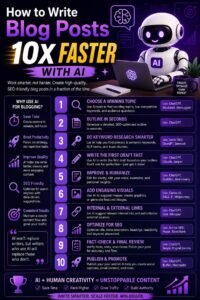
A Simple AI Blog Writing Workflow
You can create an efficient blogging process by combining AI with your own writing skills.
Step 1: Choose a topic
Pick a specific topic that solves a real reader problem.
Step 2: Define the audience
Decide who you’re writing for.
Step 3: Research the topic
Understand the subject and identify important questions.
Step 4: Create an outline
Use AI to organize the main sections.
Step 5: Write the first draft
Use AI to help with sections where you need assistance.
Step 6: Add original information
Include your own experience, examples, opinions, and insights.
Step 7: Edit the article
Improve clarity, flow, tone, and readability.
Step 8: Fact-check
Verify important information before publication.
Step 9: Optimize for SEO
Improve the title, headings, keywords, internal links, and meta description naturally.
Step 10: Publish and promote
Publish the article and repurpose it across your other marketing channels.
Best Practices for Using AI to Write Blog Posts
To get better results, keep these practices in mind:
Give AI context. The more information you provide about your audience, topic, and goal, the more useful the output can be.
Use AI for assistance, not blind automation. Always review and edit generated content.
Keep your own voice. Your personality and expertise help differentiate your content.
Verify important facts. Don’t publish questionable claims without checking them.
Focus on readers first. Write to solve a problem, not simply to increase word count.
Avoid unnecessary repetition. More words don’t automatically mean better content.
Keep improving your prompts. Experiment with different instructions until you find a workflow that works for you.
Final Thoughts
AI can completely change the way you approach blog writing.
Instead of spending hours staring at a blank page, you can use AI to brainstorm ideas, create outlines, develop first drafts, improve headlines, edit paragraphs, generate FAQs, plan SEO content, and repurpose existing articles.
But AI works best when it supports a human writer.
Your knowledge, experience, creativity, and judgment are what give a blog post its personality and value. AI can help you work faster, but you should remain responsible for the final content.
The best workflow is simple:
Plan with AI → Draft with AI → Improve with your own ideas → Edit carefully → Fact-check → Publish.
When used this way, AI becomes more than a content generator. It becomes a practical writing assistant that can help you publish useful, consistent, and engaging blog posts while saving valuable time.