Creating YouTube videos can be exciting, but it also involves a lot of work.
You need to come up with video ideas, research topics, write scripts, create thumbnails, record videos, edit footage, write descriptions, and promote your content. If you’re working alone, managing all of these tasks can quickly become overwhelming.
This is where artificial intelligence can help.
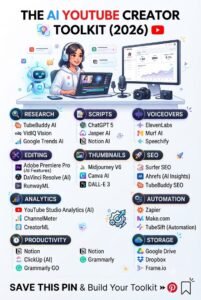
AI tools can make many parts of the YouTube content creation process faster and easier. You can use AI to brainstorm video ideas, organize research, write and improve scripts, create content calendars, generate thumbnail concepts, repurpose videos, and analyze your content strategy.
However, AI shouldn’t replace your creativity or personality.
The best YouTube channels use AI as a creative assistant, while the creator remains responsible for the ideas, opinions, storytelling, accuracy, and final quality.
In this guide, you’ll learn how to use AI for YouTube content, from coming up with your first idea to publishing and promoting your finished video.
What Is AI YouTube Content?
AI YouTube content refers to videos where artificial intelligence is used to assist with one or more parts of the content creation process.
For example, a creator might use AI to:
- Generate video ideas
- Research topics
- Create outlines
- Write scripts
- Improve titles
- Create descriptions
- Brainstorm thumbnails
- Generate captions
- Repurpose videos
- Organize a content calendar
- Analyze audience questions
AI doesn’t necessarily have to create the entire video.
In fact, using AI as a support tool can often produce more interesting content because you still bring your own experience and personality to the video.
Why Use AI for YouTube?
YouTube requires consistency.
If you want to grow a channel, you need to keep producing useful and interesting content. Unfortunately, creators can spend hours on tasks that happen before and after recording.
AI can reduce some of that workload.
For example, you might spend an hour brainstorming topics manually. AI can help you generate dozens of possibilities in a few minutes.
You can then choose the best ideas and improve them yourself.
This can make the content creation process more efficient without removing the human element.
1. Use AI to Find YouTube Video Ideas
Coming up with fresh video ideas is one of the biggest challenges for many creators.
AI can help you brainstorm topics based on your niche.
Suppose you have a cooking channel.
You could ask AI to generate video ideas around:
- Easy dinner recipes
- Budget meals
- Cooking mistakes
- Kitchen tips
- Beginner cooking techniques
- Meal preparation
- Food storage
- Recipe challenges
You can then select ideas that are genuinely useful or interesting to your audience.
Don’t blindly publish every idea AI gives you.
Your own knowledge of your audience should determine which topics are worth creating.
2. Use AI to Understand Your Audience
Good YouTube content starts with understanding viewers.
AI can help you organize common questions, concerns, and interests related to your niche.
For example, if you run a personal finance channel, you could ask AI to help identify questions beginners commonly have about:
- Saving money
- Budgeting
- Credit
- Investing
- Debt
- Side hustles
- Personal financial planning
These questions can become potential video topics.
You can also examine comments on your existing videos and use AI to summarize recurring questions or themes.
Your audience is often one of the best sources of future content ideas.
3. Use AI to Research Your Topics
Research can take a significant amount of time.
AI can help you organize research questions, identify areas you need to investigate, summarize information you’ve gathered, and create a logical structure for your video.
However, you shouldn’t assume everything an AI tool tells you is accurate.
For important claims, statistics, dates, quotes, or current information, verify the information using reliable sources.
This is especially important for topics involving health, finance, law, science, or current events.
AI should help with research—not replace fact-checking.
4. Use AI to Create YouTube Video Outlines
Once you have a topic, the next step is organizing your video.
AI can help you create an outline that includes:
- A strong introduction
- The main problem or question
- Key points
- Examples
- Practical advice
- A conclusion
- A call to action
For example, a video titled “How to Save Money as a Beginner” could be organized into:
- Why saving is difficult
- How to track spending
- How to create a basic budget
- Ways to reduce unnecessary expenses
- How to build an emergency fund
- Common mistakes
- Simple steps to start today
An outline gives you a clear structure before you begin writing the full script.
5. Use AI to Write Better YouTube Scripts
AI can help turn an outline into a first draft.
This is especially useful if you know what you want to say but struggle with organizing your thoughts.
You can ask AI to help with:
- Introductions
- Transitions
- Explanations
- Examples
- Questions
- Story structures
- Calls to action
But don’t simply read a generic AI-generated script word for word.
Add your own experiences, opinions, stories, humor, examples, and personality.
A YouTube audience wants to connect with a creator, not just listen to a collection of automatically generated sentences.
6. Create Strong Video Hooks With AI
The first few seconds of a video are important because viewers can leave at any time.
AI can help you brainstorm different hooks for your topic.
For example, instead of starting a video with:
“Today we’re going to talk about saving money.”
You might start with:
“If your money disappears every month even though you don’t think you’re spending that much, these five habits could be the reason.”
AI can generate multiple approaches, but you should choose the one that feels natural for your audience and video.
7. Use AI to Improve YouTube Titles
Your title helps viewers decide whether they want to click on your video.
AI can generate different title ideas based on your topic.
For example:
Topic: Beginner meal preparation
Possible title directions include:
- “Meal Prep for Beginners: A Simple 7-Day Plan”
- “How to Meal Prep Without Spending Hours in the Kitchen”
- “5 Meal Prep Mistakes Beginners Should Avoid”
- “The Easiest Meal Prep Routine for Busy People”
Don’t make titles misleading simply because they might attract clicks.
A strong title should accurately represent what the video delivers.
8. Use AI for YouTube Descriptions
AI can also help you create video descriptions.
A useful description can include:
- A short summary
- Important topics covered
- Relevant keywords
- Links or resources
- Calls to action
- Timestamps when appropriate
Instead of copying a generic description, give AI the actual details of your video and ask it to organize them clearly.
Then review the result before publishing.
9. Use AI to Create Thumbnail Ideas
Thumbnails are another important part of YouTube content.
Depending on the tools available to you, AI can help brainstorm thumbnail concepts, text ideas, layouts, and visual directions.
For example, a cooking video might use:
- A close-up of the finished dish
- A before-and-after comparison
- A few bold words
- A clear visual of the main ingredient
The goal isn’t to put as much information as possible on the thumbnail.
A good thumbnail should communicate the video’s basic idea quickly.
10. Use AI for Video Editing Assistance
Some modern editing tools include AI-assisted features that can help with tasks such as:
- Transcription
- Captions
- Removing pauses
- Audio cleanup
- Scene organization
- Background removal
- Short-form clip creation
- Automatic reframing
These features can save creators significant time.
However, editing still requires creative decisions.
You need to decide what should stay, what should be removed, where the pacing should change, and how the story should flow.
11. Turn Long Videos Into Shorts
One of the most useful ways to use AI for YouTube is content repurposing.
Suppose you create a 20-minute educational video.
That single video could potentially become:
- Several YouTube Shorts
- Instagram Reels
- TikTok clips
- Social media posts
- Quotes
- A newsletter
- A blog post
AI can help identify important sections and turn them into shorter content ideas.
This allows you to get more value from the work you’ve already done.
12. Use AI to Create a YouTube Content Calendar
Consistency becomes easier when you plan ahead.
AI can help you create a content calendar based on your niche and publishing schedule.
For example, if you upload once per week, AI could help organize a monthly plan:
Week 1: Beginner’s guide
Week 2: Common mistakes
Week 3: Step-by-step tutorial
Week 4: Frequently asked questions
You can also create recurring content categories so your channel doesn’t depend on random ideas.
13. Use AI to Brainstorm YouTube Series
A series can encourage viewers to return to your channel.
AI can help you develop a connected group of videos around one topic.
For example, a beginner technology channel could create a series such as:
- AI Basics for Beginners
- How to Write Better AI Prompts
- Best AI Tools for Everyday Tasks
- How to Use AI for Work
- How to Use AI for Content Creation
A series also makes planning easier because each video naturally leads to another topic.
14. Use AI to Improve Your YouTube Workflow
AI can help organize the entire content process.
A simple workflow could look like this:
Step 1: Choose a topic.
Step 2: Research the subject.
Step 3: Create an outline.
Step 4: Write and edit the script.
Step 5: Record the video.
Step 6: Edit the footage.
Step 7: Create the title and thumbnail.
Step 8: Write the description.
Step 9: Publish the video.
Step 10: Repurpose the content.
AI can assist with several steps without taking control of the entire process.
15. Use AI to Analyze Viewer Feedback
Your comments can provide valuable information.
AI can help organize large numbers of comments into common themes.
For example, viewers might repeatedly ask:
- “Can you make a beginner version?”
- “Can you explain this example?”
- “What tool are you using?”
- “Can you make a video about this topic?”
These questions can become future videos.
Instead of guessing what your audience wants, listen to what they’re already asking for.
16. Use AI to Improve Your Content Strategy
AI can help you think strategically about your channel.
You can use it to brainstorm:
- Content pillars
- Audience segments
- Video series
- Beginner and advanced topics
- Content gaps
- Repurposing opportunities
- Publishing schedules
However, don’t let AI make every strategic decision for you.
Your actual channel performance, viewer feedback, personal experience, and knowledge of your niche should guide your decisions.
Can You Create a Faceless YouTube Channel With AI?
Yes, AI can support faceless content workflows, where the creator doesn’t appear on camera.
For example, a faceless channel might use:
- Narration
- Stock footage
- Screen recordings
- Animations
- Illustrations
- Slides
- Original graphics
AI can help with scripts, narration drafts, visual concepts, captions, and editing assistance.
But simply producing large amounts of generic automated content doesn’t guarantee success.
A faceless channel still needs a clear niche, useful information, good storytelling, strong visuals, and a reason for viewers to keep watching.
Common Mistakes When Using AI for YouTube
1. Letting AI Do Everything
If AI creates the idea, script, voice, visuals, title, description, and thumbnail without meaningful human input, the result can feel generic.
Your perspective is what makes the channel different.
2. Publishing Unedited AI Scripts
AI writing often needs editing.
Read your script out loud and make sure it sounds natural.
3. Ignoring Accuracy
Never assume an AI-generated claim is automatically true.
Check important information before publishing.
4. Creating Content Only for Algorithms
Trying to satisfy an algorithm while ignoring viewers can produce weak content.
Create videos that people actually want to watch.
5. Using Clickbait
A compelling title is useful, but misleading viewers can damage trust.
Make sure the video delivers what the title promises.
6. Making Every Video Sound the Same
If every script follows exactly the same structure and language, your channel may lose personality.
Experiment with stories, examples, questions, humor, demonstrations, and personal experiences.
How Beginners Can Start Using AI for YouTube
If you’re new to YouTube, don’t try to automate everything immediately.
Start with one part of your workflow.
For example:
Week 1: Use AI for video ideas.
Week 2: Use AI to create outlines.
Week 3: Experiment with script assistance.
Week 4: Try content repurposing.
This allows you to learn how AI fits into your creative process without becoming dependent on it.
Final Thoughts
Learning how to use AI for YouTube content can make the video creation process faster, more organized, and more manageable.
AI can help you brainstorm ideas, research topics, create outlines, improve scripts, develop titles, plan thumbnails, organize content calendars, repurpose videos, and analyze viewer feedback.
But AI should support your creativity rather than replace it.
Your personality, knowledge, experience, storytelling ability, and understanding of your audience are what make your channel unique.
Use AI to handle repetitive tasks and help you work more efficiently. Then spend your time on the parts that matter most: creating useful videos, connecting with viewers, and building a channel people genuinely want to follow.
The goal isn’t to create more content simply because AI makes it easier. The goal is to create better content with less wasted time.