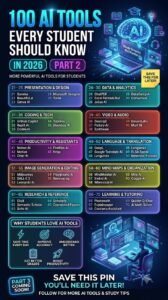
Artificial intelligence has quickly become one of the most useful technologies for learning, working, and managing everyday tasks. Students can use AI to understand difficult subjects, organize notes, research topics, improve their writing, and prepare for exams. Professionals can use the same technology to write emails, analyze information, create presentations, manage projects, and automate repetitive tasks.
The challenge is that there are now hundreds of AI tools available. Choosing the right one can be confusing, especially when different tools are designed for different purposes.
So, what are the best AI tools for students and professionals?
There is no single tool that is perfect for everyone. The best approach is to choose tools based on the task you need to complete. Below are some of the most useful AI tools to consider in 2026.
1. ChatGPT – Best Overall AI Tool
ChatGPT is one of the most versatile AI tools available for both students and professionals.
Students can use it as a learning assistant to explain difficult concepts, create practice questions, brainstorm ideas, review writing, and develop study plans. Professionals can use it to draft emails, summarize documents, brainstorm business ideas, analyze information, prepare presentations, and assist with coding.
One of the biggest advantages of ChatGPT is its flexibility. Instead of being designed for only one task, it can support many different types of work.
Best for:
- Studying and tutoring
- Brainstorming
- Writing and editing
- Research assistance
- Coding
- Summarizing information
- Creating study plans
- Workplace productivity
The best way to use ChatGPT for education is as a learning partner rather than simply asking it to complete assignments. Ask it to explain concepts, quiz you, identify weaknesses, or provide feedback on your own work.
Research published in 2026 has also found potential benefits from ChatGPT-assisted academic writing, including improvements in writing quality and students’ writing experience.
2. Google Gemini – Best for Google-Based Work
Google Gemini is another useful AI assistant for students and professionals, particularly people who already use Google’s ecosystem.
It can help with brainstorming, writing, research, summarization, and other productivity tasks. Its integration with Google’s broader productivity environment can make it particularly convenient for people who regularly use tools such as Google Docs and other Google services.
Students can use Gemini to understand lessons, brainstorm project ideas, summarize information, and prepare study materials.
Professionals can use it to generate ideas, draft content, organize information, and improve workplace productivity.
Best for:
- Google Workspace users
- Research and brainstorming
- Writing assistance
- Summarization
- General productivity
3. Claude – Best for Writing and Long Documents
Claude is particularly useful when you need help understanding or working with large amounts of text.
Students can use it to analyze lengthy readings, review essays, explain complicated topics, and brainstorm ideas. Professionals can use it to review reports, summarize documents, analyze business information, and improve written communication.
Claude is also useful when you want feedback rather than simply an answer. Its education-focused features emphasize learning and guided reasoning, which can make it useful for students who want to understand a subject instead of simply receiving a completed response.
Best for:
- Long documents
- Writing assistance
- Detailed explanations
- Research support
- Brainstorming
- Professional communication
4. Perplexity – Best for AI-Powered Research
Perplexity is particularly useful for research because it is designed around searching for information and presenting sources alongside answers.
For students, this can be helpful when researching an essay, project, presentation, or academic topic. Instead of relying on an AI response without knowing where the information came from, users can follow the cited sources and verify important claims.
Professionals can also use Perplexity to research industries, competitors, technologies, market developments, and business topics.
However, users should still open and evaluate the original sources, particularly when using information for academic or professional work.
Best for:
- Research
- Finding sources
- Exploring unfamiliar topics
- Fact-checking
- Market research
- Current information
5. NotebookLM – Best for Studying Your Own Materials
NotebookLM is especially useful for students who have large amounts of course material.
Google’s current product documentation identifies NotebookLM as Gemini Notebook, following a 2026 product evolution. It allows users to upload sources such as notes, lecture recordings, and other class materials, then ask questions based on those sources. It can also generate study materials such as flashcards, quizzes, mind maps, and audio overviews.
This makes it useful for turning a collection of lecture notes or reading materials into a personalized study system.
Best for:
- Lecture notes
- Exam preparation
- Course readings
- Flashcards
- Quizzes
- Source-based questions
- Study guides
For students, one useful strategy is to upload your course materials and ask questions about them instead of asking a general chatbot about the subject.
6. Grammarly – Best for Writing and Editing
Good writing is important for both academic and professional success.
Grammarly uses AI to help users improve grammar, spelling, clarity, tone, and overall communication.
Students can use it when proofreading essays, assignments, applications, and reports. Professionals can use it for emails, proposals, presentations, reports, resumes, and other workplace communication.
The important thing is to use Grammarly as an editing assistant rather than allowing it to completely replace your own writing style.
Best for:
- Grammar
- Proofreading
- Professional emails
- Essays
- Resumes
- Clarity and tone
7. Canva AI – Best for Presentations and Visual Content
Students and professionals frequently need to create presentations, posters, social media graphics, reports, and other visual materials.
Canva’s AI features can help users generate ideas and create visual content more efficiently.
Students can use Canva to prepare class presentations, project posters, infographics, and educational materials.
Professionals can use it for presentations, marketing graphics, social media content, business documents, and promotional materials.
Best for:
- Presentations
- Infographics
- Posters
- Social media graphics
- Marketing materials
- Visual communication
8. GitHub Copilot – Best for Coding
For students studying computer science, software engineering, or related subjects, AI coding assistants can significantly change the programming workflow.
GitHub Copilot can help programmers write code, understand existing code, generate suggestions, and identify possible solutions to programming problems.
Students should be careful not to use coding AI simply to complete assignments without understanding the code. A better approach is to ask the AI to explain why the code works, identify mistakes, or suggest improvements.
Professionals can use coding assistants to speed up development and reduce time spent on repetitive programming tasks.
Best for:
- Programming
- Debugging
- Code explanations
- Software development
- Learning programming
9. Notion AI – Best for Organization and Productivity
Notion is widely used for organizing notes, projects, documents, tasks, and knowledge. Its AI features add another layer of productivity.
Students can use it to organize course notes, create study schedules, manage assignments, and summarize information.
Professionals can use it to manage projects, organize meeting notes, create documentation, and structure workplace information.
Best for:
- Organization
- Project management
- Note-taking
- Meeting notes
- Personal productivity
10. AI Tools for Mathematics and Technical Subjects
Students studying mathematics, engineering, physics, economics, and other quantitative subjects can also benefit from specialized AI tools.
Tools such as Wolfram|Alpha are designed around computational and mathematical problem-solving rather than general conversation.
These tools can be useful for checking calculations, exploring mathematical concepts, and understanding how solutions are obtained.
However, students should avoid simply copying answers. The most effective approach is to use AI to understand the process and then solve similar problems independently.
Best AI Tools for Students vs. Professionals
Different users have different needs, so the “best” tool depends on what you are trying to accomplish.
| Tool | Best For | Students | Professionals |
|---|---|---|---|
| ChatGPT | General AI assistance | Excellent | Excellent |
| Gemini | Google-based productivity | Excellent | Excellent |
| Claude | Writing and documents | Excellent | Excellent |
| Perplexity | Research | Excellent | Excellent |
| NotebookLM | Studying personal materials | Excellent | Good |
| Grammarly | Writing and proofreading | Excellent | Excellent |
| Canva AI | Visual content | Excellent | Excellent |
| GitHub Copilot | Coding | Excellent | Excellent |
| Notion AI | Organization | Good | Excellent |
| Wolfram|Alpha | Mathematics | Excellent | Good |
How to Choose the Right AI Tool
You don’t need to subscribe to every AI service available.
Instead, identify the tasks you perform most often.
If you’re a student, you might start with:
ChatGPT + Perplexity + NotebookLM + Grammarly
This combination can cover tutoring, research, studying, and writing.
If you’re a professional, you might prefer:
ChatGPT + Claude + Gemini + Grammarly + Canva
This combination can support communication, research, document analysis, productivity, and presentations.
For programmers, adding an AI coding assistant such as GitHub Copilot can make the workflow even more powerful.
How to Use AI Responsibly
AI can be extremely helpful, but it should not replace your own thinking.
AI systems can produce incorrect information, outdated information, or fabricated references. Therefore, important facts should be checked against reliable sources.
Students should also follow their school’s or university’s rules regarding AI use. Some assignments may permit AI for brainstorming or proofreading but prohibit submitting AI-generated work as your own.
Professionals should also avoid putting confidential company information, private customer data, passwords, or sensitive documents into AI services unless their organization’s approved policies and security controls allow it.
The goal should be to use AI to increase your abilities rather than replace them.
Final Thoughts
The best AI tools for students and professionals are not necessarily the tools with the most features. The best tools are the ones that solve real problems and fit naturally into your workflow.
For students, AI can make studying more interactive, help explain difficult concepts, organize notes, support research, and improve writing.
For professionals, AI can reduce repetitive work, improve communication, assist with research, analyze documents, support creativity, and increase productivity.
The most effective users will probably not be those who rely on one AI tool for everything. Instead, they will learn how to choose the right tool for each task.
Whether you’re preparing for an exam, writing a research paper, creating a presentation, managing a business project, or learning to code, AI can become a powerful assistant when used thoughtfully.
The key is simple: let AI help you work smarter, but keep your judgment, creativity, and critical thinking at the center of the work.